
The sale that landed in the wrong revenue account: how Business Central posting groups choose the G/L account
The month-end review turns up a sale in the wrong revenue account. Nobody typed that account number. The order clerk picked a customer and an item, and Business Central did the rest. So where did the account come from?
In Business Central, almost no one chooses G/L accounts for sales, purchases or inventory. Posting groups do. Get them right and the ledger takes care of itself. Get them wrong and the errors are quiet, consistent and spread across thousands of entries before anyone notices. This article explains how Business Central picks the account, how to find the setup behind a bad entry, and what to check before year-end.
For the CFO, in three lines
- Why it matters: Posting groups pick the G/L account on every sale, purchase and inventory entry; nobody types it.
- What goes wrong: One wrong setup line sends every matching transaction to the wrong account, month after month.
- Ask your team: Who is allowed to change posting setup, and is it reviewed?
The account comes from three things you chose months ago
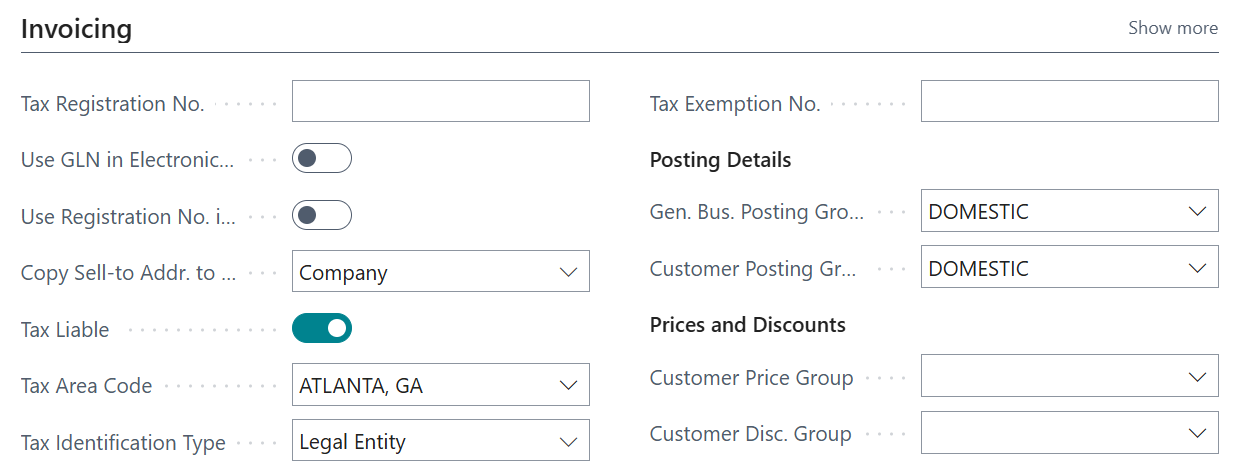
Every customer, vendor, item and resource carries posting group codes. Business Central combines them at the moment of posting to look up the G/L account. There are three families:
| Family | Assigned to | Setup page that holds the accounts | Decides |
|---|---|---|---|
| General business posting group | Customers and vendors | General Posting Setup (combined with the product group) | Who you're trading with: domestic, export, intercompany |
| General product posting group | Items and resources | General Posting Setup (combined with the business group) | What you're selling or buying: goods, services, freight |
| Specific posting groups | Customers (Customer Posting Groups), vendors (Vendor Posting Groups), items (Inventory Posting Groups), bank accounts, fixed assets | Their own pages; inventory uses Inventory Posting Setup | Balance sheet accounts: receivables, payables, inventory |
Sales tax or VAT has its own pair of groups and its own setup page, which we'll leave for another article.
Microsoft's documentation puts the logic simply. Revenue and cost of goods sold come from the combination of the general business posting group and the general product posting group. Receivables come from the customer posting group. Inventory comes from the inventory posting group together with the location.
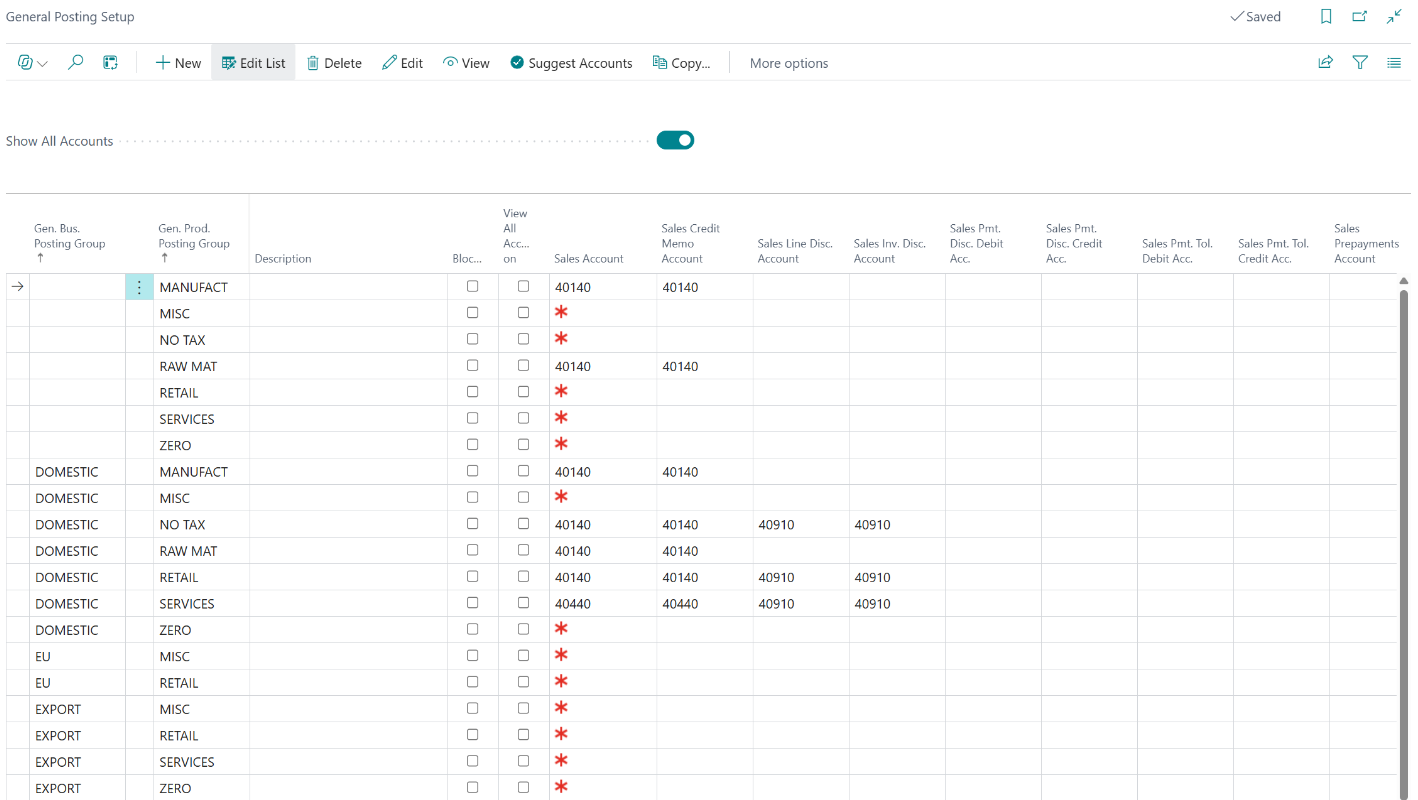
General Posting Setup is a matrix. Each line is one business group crossed with one product group, and each line carries the accounts for sales, purchases, cost of goods sold, inventory adjustments, direct cost applied, overhead applied, purchase variances and more. If you have four business groups and six product groups, you can have up to 24 lines, and every one of them has to be right.
Follow one item through the ledger
Here's what a single item does, using the worked example from Microsoft's own design-details documentation. Take one item: buy 10 units at $7 each, plus $1 per unit of overhead, then sell all 10.
The purchase and sale create item ledger entries and value entries: a direct cost of $70 and an indirect cost of $10 on the way in, and a cost of $80 on the way out. When inventory cost reaches the G/L (automatically, or through Post Inventory Cost to G/L), Business Central creates:
| Event | Debit | Credit | Where the account comes from |
|---|---|---|---|
| Purchase, direct cost | Inventory Account 70 | Direct Cost Applied Account 70 | Inventory Posting Setup / General Posting Setup |
| Purchase, overhead | Inventory Account 10 | Overhead Applied Account 10 | Inventory Posting Setup / General Posting Setup |
| Sale, cost | COGS 80 | Inventory Account 80 | General Posting Setup / Inventory Posting Setup |
The sale itself also posts revenue and a receivable: revenue from the General Posting Setup line for the customer's business group and the item's product group, and the receivable from the customer's customer posting group.
So one sale draws on the customer's two posting groups, the item's two posting groups and the location. A wrong value in any one of them sends money to the wrong place.
The rules that catch people out
The cards decide, not the revenue account. A G/L account can carry its own posting groups too, which misleads people. On a sales document, Microsoft says the header uses the customer card information and the lines use the item card information. So the business group comes from the customer and the product group from the item. If a sale posts to the wrong account, look at those cards and the General Posting Setup line for that pair. Changing the groups on the G/L account won't fix a wrong customer card.
Item journals need a line with a blank business group. Positive and negative adjustments in the item journal have no customer or vendor, so there's no business posting group. Microsoft's guidance is to create a General Posting Setup line for each general product posting group with the business group left blank. Without it, inventory adjustments fail to post, or post to whatever someone typed in a hurry to get past the error.
You can't delete a setup once it's been used. After documents are posted, Microsoft notes you can't delete posting groups or setups that were used incorrectly, because G/L entries exist for them. The safe fix is the Blocked field on the General Posting Setup line, so nobody uses the combination again.
Placeholder setups. When a posting fails because an account is missing, Business Central shows the notification "G/L Account is missing in posting group or setup" and can create a placeholder posting group or setup for you to complete. Microsoft notes some organizations don't allow this and turn the notification off. It's useful, and dangerous: filling in one account on a placeholder line, just to get the invoice out, is how matrices fill up with lines nobody designed.
One customer, more than one receivables account. Since 2023 release wave 2, you can turn on Allow Multiple Posting Groups on Sales & Receivables Setup (and on Purchases & Payables Setup for vendors), set up Alternative Groups, turn the same toggle on for each customer or vendor that needs it, and let the document carry a different customer or vendor posting group. Useful for, say, a customer you invoice in two different capacities. It also means the receivables account can now differ by document, so reconciling the aged receivables to the G/L needs more care.
How to trace a bad entry back to its setup
- Open the G/L entry and use Find entries to see the document and every entry it created.
- On the posted document line, note the customer or vendor, the item or resource, and the location.
- Check which groups were used at the time of posting. Someone may have changed the card since, so trust the posted document, not the card: the posted invoice line records the general business and product posting groups, and the posted invoice header and the customer ledger entry record the customer posting group.
- Look up the general product posting group and inventory posting group on the item.
- Open General Posting Setup filtered on that business and product group pair. That line holds the account. For balance sheet accounts, check Inventory Posting Setup for the location and inventory posting group pair.
- Decide whether the setup is wrong (fix the line or block it) or the master record is wrong (fix the card). Then correct the posted entries with a journal or a corrective document. Fixing the setup doesn't touch history.
A useful check for the whole matrix: on General Posting Setup, turn on Show All Accounts so every account appears as a column, then look down each column. Revenue accounts that differ for no reason, blanks where you expect an account, or the same account used for two things that finance reports separately, are what to question.
The mistakes we see most
- Too many groups. A product posting group for every item category, copied from the old system. The matrix multiplies, and every new group means a row of accounts someone has to remember. If two groups always post to the same accounts, they should be one group, and reporting differences belong in dimensions.
- Posting groups doing a dimension's job. Using separate groups to split revenue by region or salesperson. That's what dimensions are for. Posting groups should reflect accounting treatment, not analysis.
- Accounts left open to direct posting. Receivables, payables, inventory and bank accounts should be fed only by their subledgers. Microsoft recommends setting Direct Posting to No on bank accounts used in posting groups, and the same discipline applies to the other control accounts. A manual journal straight to the inventory account is the classic reason the inventory doesn't tie (see why inventory doesn't match the G/L).
- Changing a card instead of the setup. Moving a customer to a new business group to "fix" one invoice, which changes every future invoice for them.
- No change log. Posting groups are high-risk setup. Business Central's change log can track them. Microsoft lists the posting group tables as examples (Customer Posting Group 92, Vendor Posting Group 93, Inventory Posting Group 94 and others). Add the tables that actually hold the accounts too: General Posting Setup (table 252) and Inventory Posting Setup. If nobody can tell you who changed a posting setup line last quarter, turn the change log on for these tables.
When it's a bigger problem
A single wrong line is a ten-minute fix. Block it, correct the account, post a reclassification journal.
It's a different conversation when the matrix has dozens of lines no one can explain, when month-end always includes a set of "posting group" reclasses, or when the auditors ask why the same product posts to three revenue accounts. That usually means the posting design was copied from the old system instead of designed for Business Central, and the cleanest fix is a redesign with a planned cutover date, not more patches. Year-end is a natural point to make that change.
Nobody picks the G/L account in Business Central. Your posting groups do, on every line, every time.
Posting groups checklist
- Can you explain every line on General Posting Setup in one sentence?
- A blank-business-group line exists for every general product posting group used on items.
- Unused or wrong combinations are Blocked, not left open.
- Receivables, payables, inventory and bank accounts don't allow direct posting.
- Reporting splits live in dimensions, not extra posting groups.
- The change log covers the posting group tables and General Posting Setup and Inventory Posting Setup.
- If Allow Multiple Posting Groups is on, your receivables and payables reconciliations account for it.